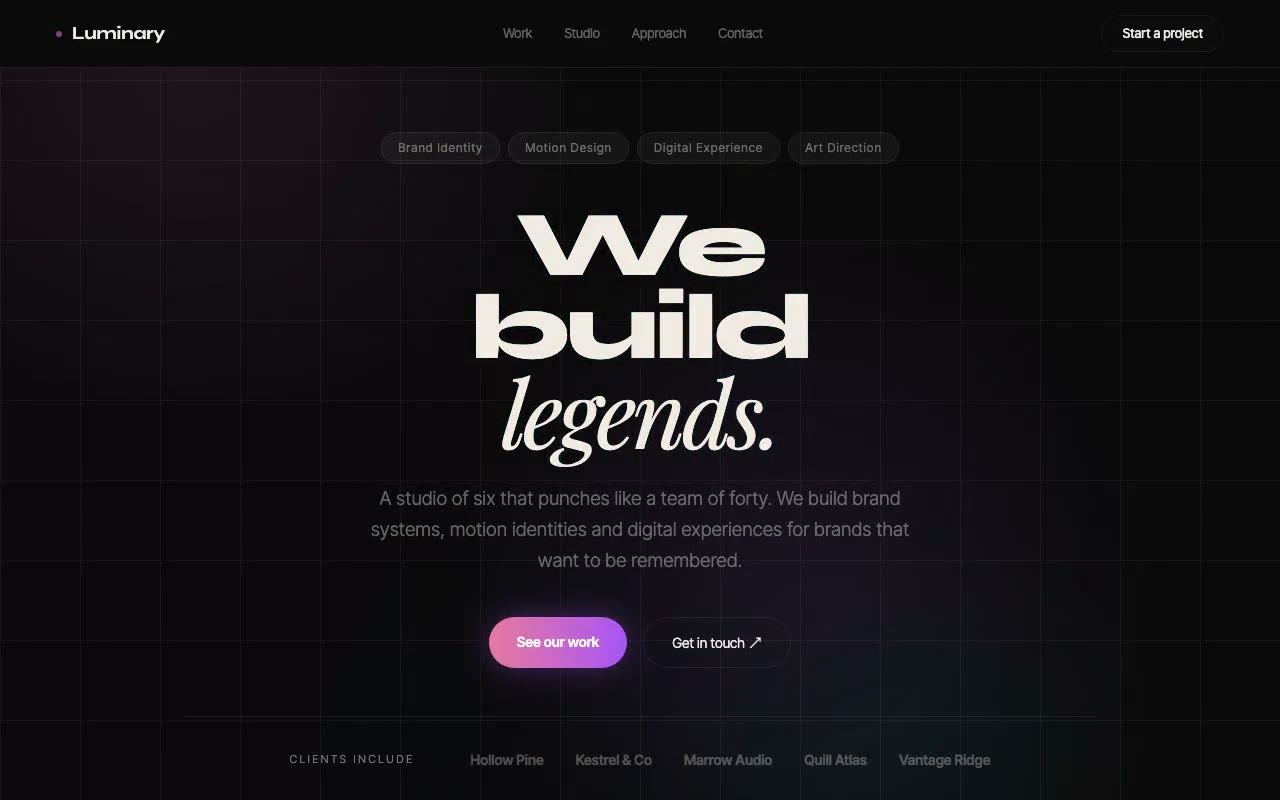
Full-screen near-black hero with drifting pink, violet and cyan glows; the headline words scramble and resolve left to right in a cyan afterglow, then the chips, subhead and CTA pair fade up.
Luminary — Creative Studio Hero
A dark, high-drama creative studio hero where the headline scrambles through random glyphs on load before resolving letter by letter, like decrypting a transmission. Built for brand studios, motion designers and creative agencies.
Create a free account to copy 3 premium prompts. No card needed
- 01Copy the promptClick the button above to copy the full prompt to your clipboard.
- 02Paste into your AI toolWorks in Claude, ChatGPT, Cursor, v0, Lovable, or Bolt.
- 03Swap in your brand detailsReplace the brand name, copy, and image URLs with your own.
- 04Drop the code into your projectThe output is a self-contained React component. Paste it straight in.
What it generates
- ✓Full-screen dark hero with a ScrambleWord component: glyphs cycle at 60ms, then resolve left to right at 80ms per letter
- ✓Cyan afterglow on each resolved letter via a 600ms text-shadow keyframe
- ✓Three-line Syne 800 headline with a Playfair Display italic final word for serif contrast
- ✓Drifting pink, violet and cyan blur blobs over a faint hairline grid, with no photography
- ✓Staggered fade-up on the chips, subhead, CTA pair and client row
- ✓Primary gradient CTA and ghost secondary button with hover states
- ✓Accessible: aria-label on the H1, real text in a visually-hidden span, aria-hidden glyph layer
- ✓prefers-reduced-motion: the scramble is skipped and all animation stops
Best for
- →Brand studios and creative agencies
- →Motion designers and visual artists
- →Dark-mode portfolio and studio launches
- →High-drama above-the-fold first impressions
- →Teams that want a signature moment on load
Not suitable for
- ✕Full multi-page websites (hero only)
- ✕Backend or database logic
- ✕Non-React frameworks (Vue, Svelte, etc.)
Written for
- ✓ClaudePreview built with Claude
- ✓ChatGPTPaste into a chat
- ✓CursorBuild inside your repo
- ✓v0 by VercelComponent generator
- ✓LovableApp builder
- ✓BoltIn-browser builder
Licence
Commercial use included. Use in client projects, products, and paid work. No attribution required.
Common questions
Related reading
Landing Page Hero Section Best Practices for 2026: The 7 Elements
Hero section best practices for landing pages and homepages: the seven elements every hero needs, the mistakes that cost conversions, and a checklist to use today.
Claude Prompts for Web Design: How to Write Them
Claude prompts for web design that produce a site you would ship, not a generic template. The structure, with examples you can copy.
Related prompts