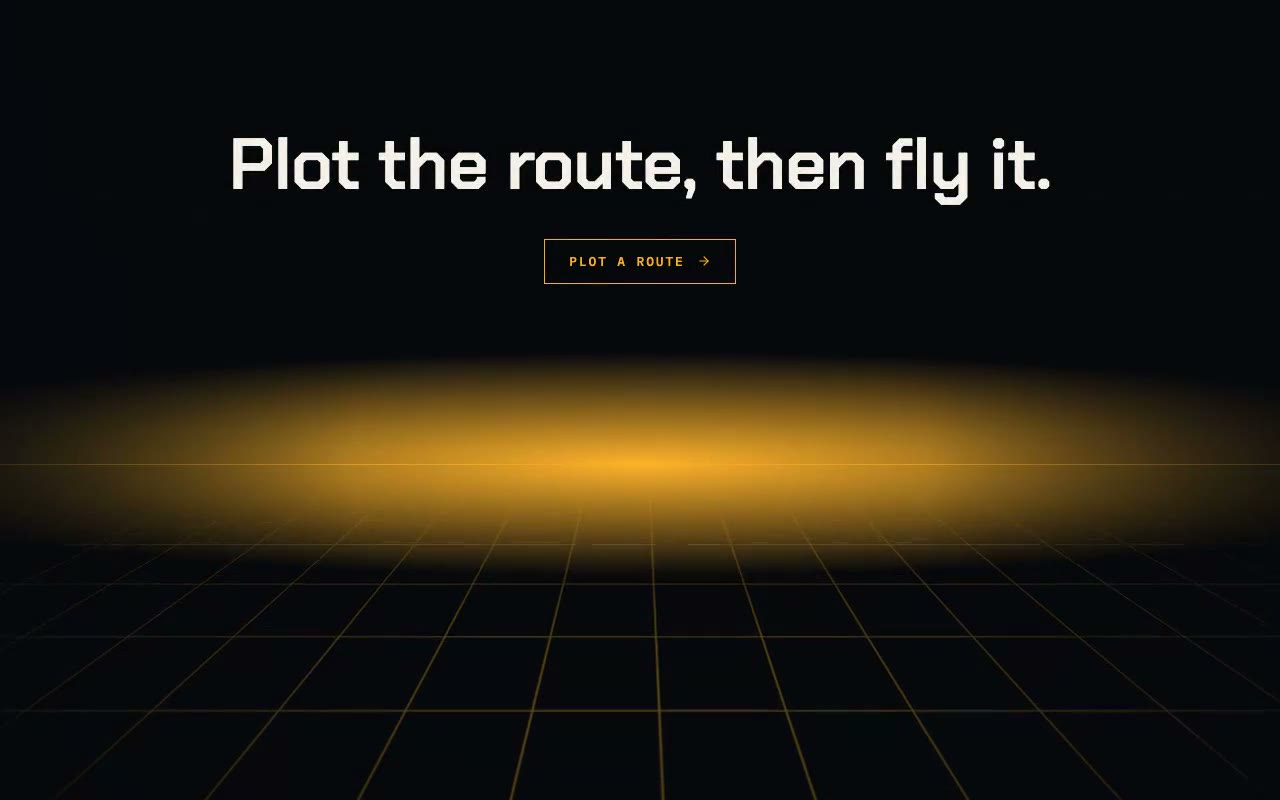
An amber grid streams toward the viewer beneath a glowing horizon, a bright scan band sweeps down the floor, and a mono-type call to action rises into place.
Azimuth — Flying Perspective Grid Background
A CSS 3D perspective grid that flies toward the viewer on a seamless loop, with a glowing horizon and a scan band sweeping the floor. For tech, telemetry and mission-control heroes that want motion with a clear sense of depth.
Create a free account to copy 3 premium prompts. No card needed
- 01Copy the promptClick the button above to copy the full prompt to your clipboard.
- 02Paste into your AI toolWorks in Claude, ChatGPT, Cursor, v0, Lovable, or Bolt.
- 03Swap in your brand detailsReplace the brand name, copy, and image URLs with your own.
- 04Drop the code into your projectThe output is a self-contained React component. Paste it straight in.
What it generates
- ✓AzimuthGrid component with color, cell, speed, horizon and intensity props
- ✓Grid plane tilted 72° in 3D, with a repeating one-cell background shift for a seamless fly-through
- ✓Perspective origin pinned to the horizon, so every grid line converges at the vanishing point
- ✓Scan band that sweeps the plane every 3.4 seconds with eased fade in and out
- ✓Horizon line and radial glow that brighten at the vanishing line
- ✓Distance fade mask so the grid dissolves toward the horizon
- ✓Headline set in the sky above the horizon so text never sits on grid lines
- ✓Reduced-motion fallback: static floor, no scan, no entrance animation
Best for
- →Tech, telemetry and mission-control product heroes
- →Developer tools and dashboards that want depth
- →Gaming, sci-fi and simulation landing pages
- →Logistics, mapping and fleet-management pages
Not suitable for
- ✕Full multi-page websites (hero only)
- ✕Backend or database logic
- ✕Non-React frameworks (Vue, Svelte, etc.)
Written for
- ✓ClaudePreview built with Claude
- ✓ChatGPTPaste into a chat
- ✓CursorBuild inside your repo
- ✓v0 by VercelComponent generator
- ✓LovableApp builder
- ✓BoltIn-browser builder
Licence
Commercial use included. Use in client projects, products, and paid work. No attribution required.
Common questions
Related reading
Landing Page Hero Section Best Practices for 2026: The 7 Elements
Hero section best practices for landing pages and homepages: the seven elements every hero needs, the mistakes that cost conversions, and a checklist to use today.
Claude Prompts for Web Design: How to Write Them
Claude prompts for web design that produce a site you would ship, not a generic template. The structure, with examples you can copy.
Related prompts