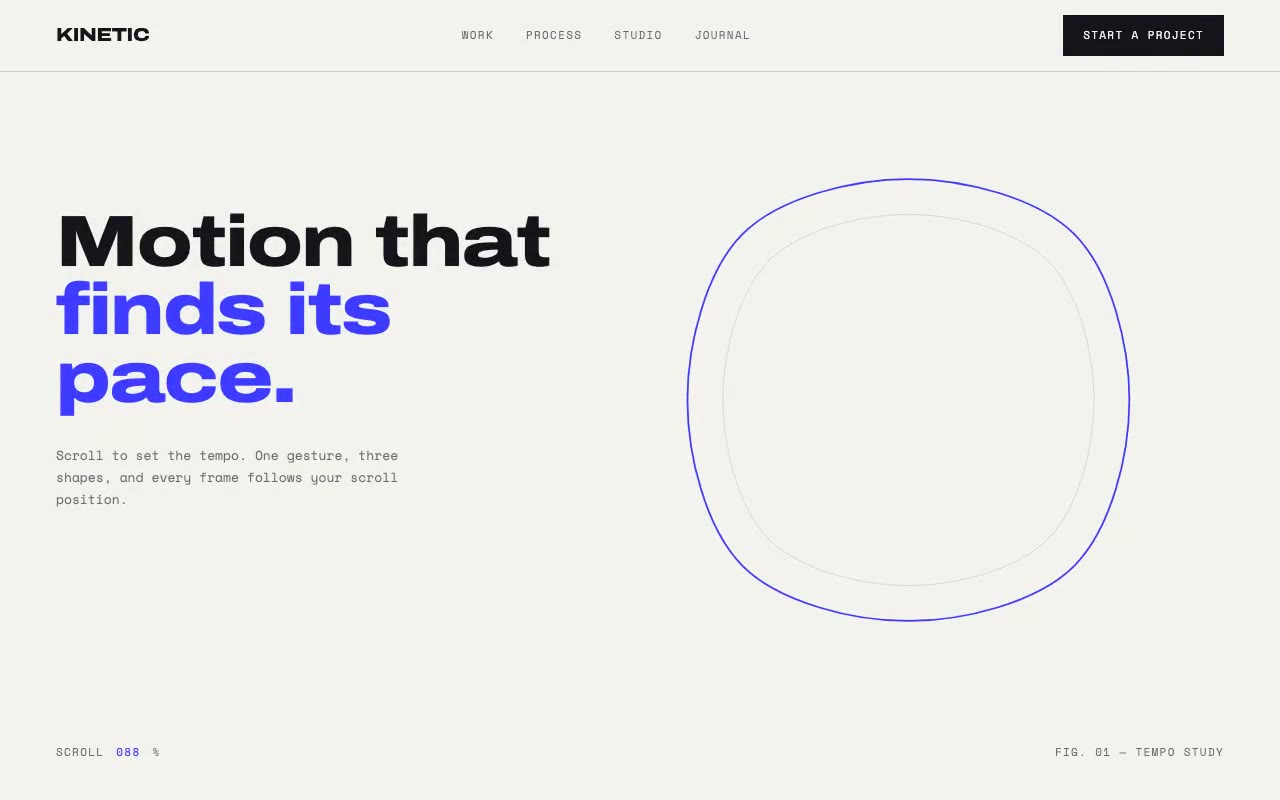
Off-white pinned stage with a cobalt outline drawing itself on load, a live scroll percentage in the corner, and as you scroll the blob morphs into a circle beside the headline "finds its pace."
Kinetic — Scroll-Driven Motion Hero
A light, motion-first hero where one cobalt line draws itself on load and then morphs between three shapes as the reader scrolls, with character-by-character reveals and a counting numeral. Built for motion design studios, animation houses and product teams that want scroll to drive the story.
Create a free account to copy 3 premium prompts. No card needed
- 01Copy the promptClick the button above to copy the full prompt to your clipboard.
- 02Paste into your AI toolWorks in Claude, ChatGPT, Cursor, v0, Lovable, or Bolt.
- 03Swap in your brand detailsReplace the brand name, copy, and image URLs with your own.
- 04Drop the code into your projectThe output is a self-contained React component. Paste it straight in.
What it generates
- ✓Pinned 300vh hero stage with a single SVG path that draws itself over 1800ms on load
- ✓Scroll-driven morph between three shapes through a Catmull-Rom to Bézier path builder
- ✓Live scroll meter and echo path driven by one requestAnimationFrame per scroll
- ✓Expanded Archivo headline with line-by-line rise and a Space Mono sub-headline
- ✓Principles section with character-by-character card reveals on IntersectionObserver
- ✓Scale section with a count-up numeral and two lines that grow from the centre
- ✓Zero animation libraries: CSS keyframes, SVG and refs only
- ✓prefers-reduced-motion freezes the morph at its midpoint and shows the final numeral
Best for
- →Motion design studios and animation houses
- →Product teams that want scroll to drive the story
- →Launch pages for kinetic or interaction-heavy products
- →Portfolio openers for motion designers
Not suitable for
- ✕Full multi-page websites (hero only)
- ✕Backend or database logic
- ✕Non-React frameworks (Vue, Svelte, etc.)
Written for
- ✓ClaudePreview built with Claude
- ✓ChatGPTPaste into a chat
- ✓CursorBuild inside your repo
- ✓v0 by VercelComponent generator
- ✓LovableApp builder
- ✓BoltIn-browser builder
Licence
Commercial use included. Use in client projects, products, and paid work. No attribution required.
Common questions
Related reading
Landing Page Hero Section Best Practices for 2026: The 7 Elements
Hero section best practices for landing pages and homepages: the seven elements every hero needs, the mistakes that cost conversions, and a checklist to use today.
Claude Prompts for Web Design: How to Write Them
Claude prompts for web design that produce a site you would ship, not a generic template. The structure, with examples you can copy.
Related prompts