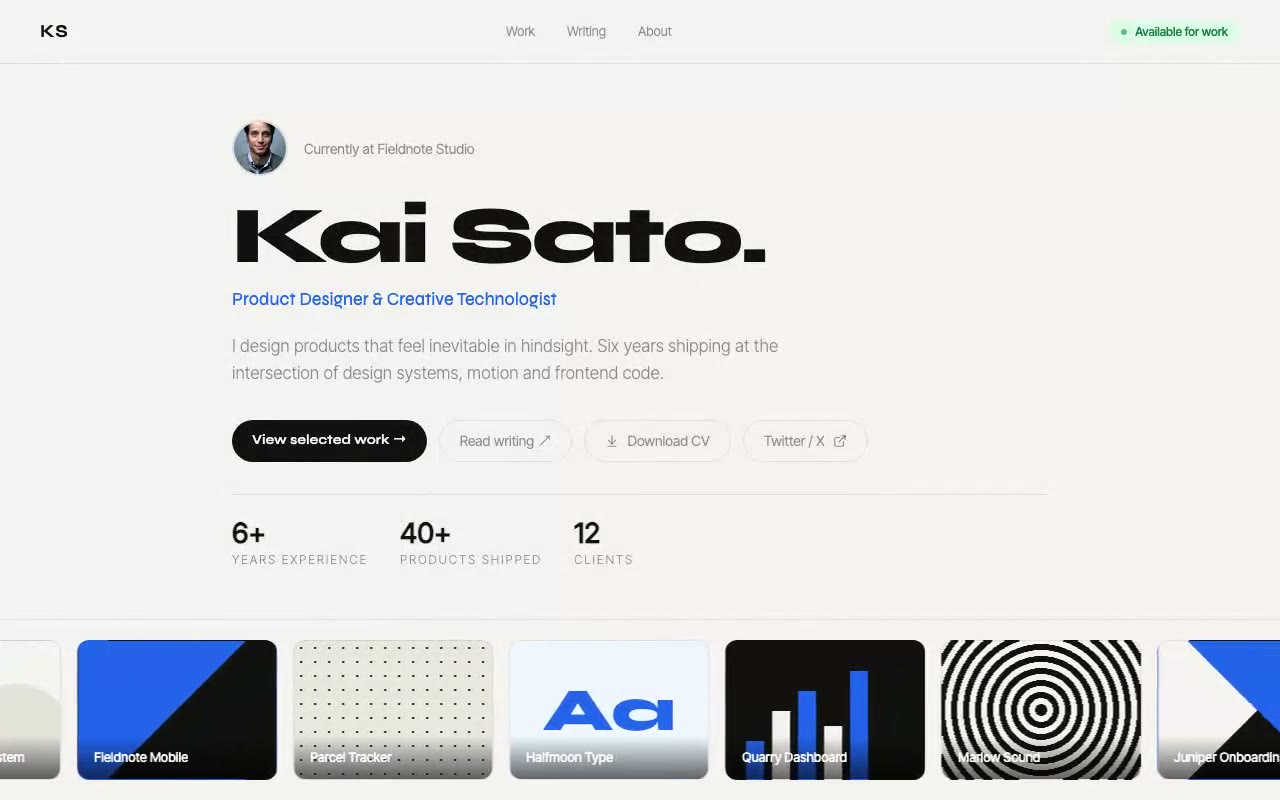
Warm off-white hero with a Syne 800 name, a blue role line and an availability pill, with a continuous work tape of CSS-drawn project thumbnails drifting across the bottom edge.
Kai Sato — Minimal Personal Brand Hero
A minimal personal brand hero with a draggable work tape at the foot of the first screen: a looping strip of project thumbnails that drifts on its own, can be flung left or right, and pauses while touched. Built for product designers, creative technologists and indie makers.
Create a free account to copy 3 premium prompts. No card needed
- 01Copy the promptClick the button above to copy the full prompt to your clipboard.
- 02Paste into your AI toolWorks in Claude, ChatGPT, Cursor, v0, Lovable, or Bolt.
- 03Swap in your brand detailsReplace the brand name, copy, and image URLs with your own.
- 04Drop the code into your projectThe output is a self-contained React component. Paste it straight in.
What it generates
- ✓Warm off-white hero with a sticky nav, availability pill and bio, sized to the viewport
- ✓Draggable work tape: pointer-captured drag with inertia that decays at 0.95 per frame
- ✓Continuous loop that drifts at 64px per second and wraps without an empty edge
- ✓Eight CSS-drawn project thumbnails with distinct patterns and name overlays, no photo dependency
- ✓Drift pauses while the pointer is on the tape and resumes on leave
- ✓Syne 800 display name with a blue Syne role line and Inter Tight body copy
- ✓Quick-link row with CV download and social buttons, plus a three-stat strip
- ✓Responsive: full-width stacked buttons on mobile and the tape stays full-bleed
Best for
- →Product designers and UX/UI designers
- →Creative technologists and indie hackers
- →Developers with side projects to showcase
- →Anyone replacing a basic link-in-bio with something memorable
Not suitable for
- ✕Full multi-page websites (hero only)
- ✕Backend or database logic
- ✕Non-React frameworks (Vue, Svelte, etc.)
Written for
- ✓ClaudePreview built with Claude
- ✓ChatGPTPaste into a chat
- ✓CursorBuild inside your repo
- ✓v0 by VercelComponent generator
- ✓LovableApp builder
- ✓BoltIn-browser builder
Licence
Commercial use included. Use in client projects, products, and paid work. No attribution required.
Common questions
Related reading
Landing Page Hero Section Best Practices for 2026: The 7 Elements
Hero section best practices for landing pages and homepages: the seven elements every hero needs, the mistakes that cost conversions, and a checklist to use today.
Claude Prompts for Web Design: How to Write Them
Claude prompts for web design that produce a site you would ship, not a generic template. The structure, with examples you can copy.
Related prompts