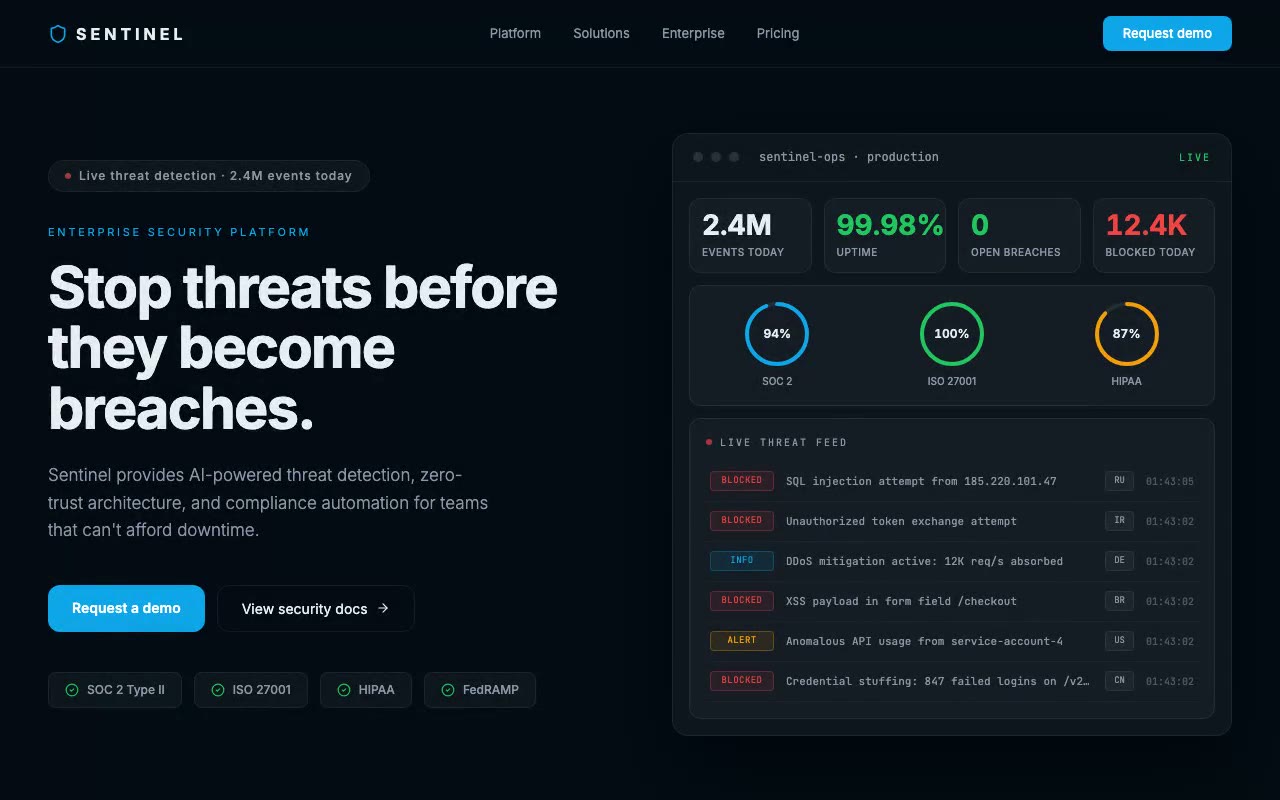
Near-navy dashboard with stat counters ticking up, three compliance rings sweeping to 94%, 100% and 87%, and a threat row sliding into the live feed.
Sentinel — Enterprise Security SaaS Hero
A dark enterprise hero whose live security-operations dashboard prepends a new blocked threat every three seconds while SOC 2, ISO 27001 and HIPAA rings sweep to their scores. Built for cybersecurity, compliance and B2B platforms selling to IT and security buyers.
Create a free account to copy 3 premium prompts. No card needed
- 01Copy the promptClick the button above to copy the full prompt to your clipboard.
- 02Paste into your AI toolWorks in Claude, ChatGPT, Cursor, v0, Lovable, or Bolt.
- 03Swap in your brand detailsReplace the brand name, copy, and image URLs with your own.
- 04Drop the code into your projectThe output is a self-contained React component. Paste it straight in.
What it generates
- ✓Full-height dark hero with a live security-operations dashboard mockup beside the copy
- ✓Threat feed that prepends a new blocked, alert or info event every 3 seconds, with severity badges and clock timestamps
- ✓SVG compliance rings (SOC 2, ISO 27001, HIPAA) that sweep to their scores with counting percentages
- ✓Four stat cards that count up on load: events today, uptime, active breaches, threats blocked
- ✓JetBrains Mono for all terminal-style text, Inter for everything else
- ✓Compliance credential row (SOC 2 Type II, ISO 27001, HIPAA, FedRAMP) with check icons
- ✓Primary "Request a demo" CTA plus a "View security docs" secondary button
- ✓Customer trust bar with five fictional enterprise wordmarks
Best for
- →Cybersecurity and threat-intelligence platforms
- →Compliance and audit SaaS tools
- →Enterprise B2B platforms that need authority signals
- →DevSecOps and infrastructure security products
Not suitable for
- ✕Full multi-page websites (hero only)
- ✕Backend or database logic
- ✕Non-React frameworks (Vue, Svelte, etc.)
Written for
- ✓ClaudePreview built with Claude
- ✓ChatGPTPaste into a chat
- ✓CursorBuild inside your repo
- ✓v0 by VercelComponent generator
- ✓LovableApp builder
- ✓BoltIn-browser builder
Licence
Commercial use included. Use in client projects, products, and paid work. No attribution required.
Common questions
Related reading
Landing Page Hero Section Best Practices for 2026: The 7 Elements
Hero section best practices for landing pages and homepages: the seven elements every hero needs, the mistakes that cost conversions, and a checklist to use today.
Claude Prompts for Web Design: How to Write Them
Claude prompts for web design that produce a site you would ship, not a generic template. The structure, with examples you can copy.
Related prompts