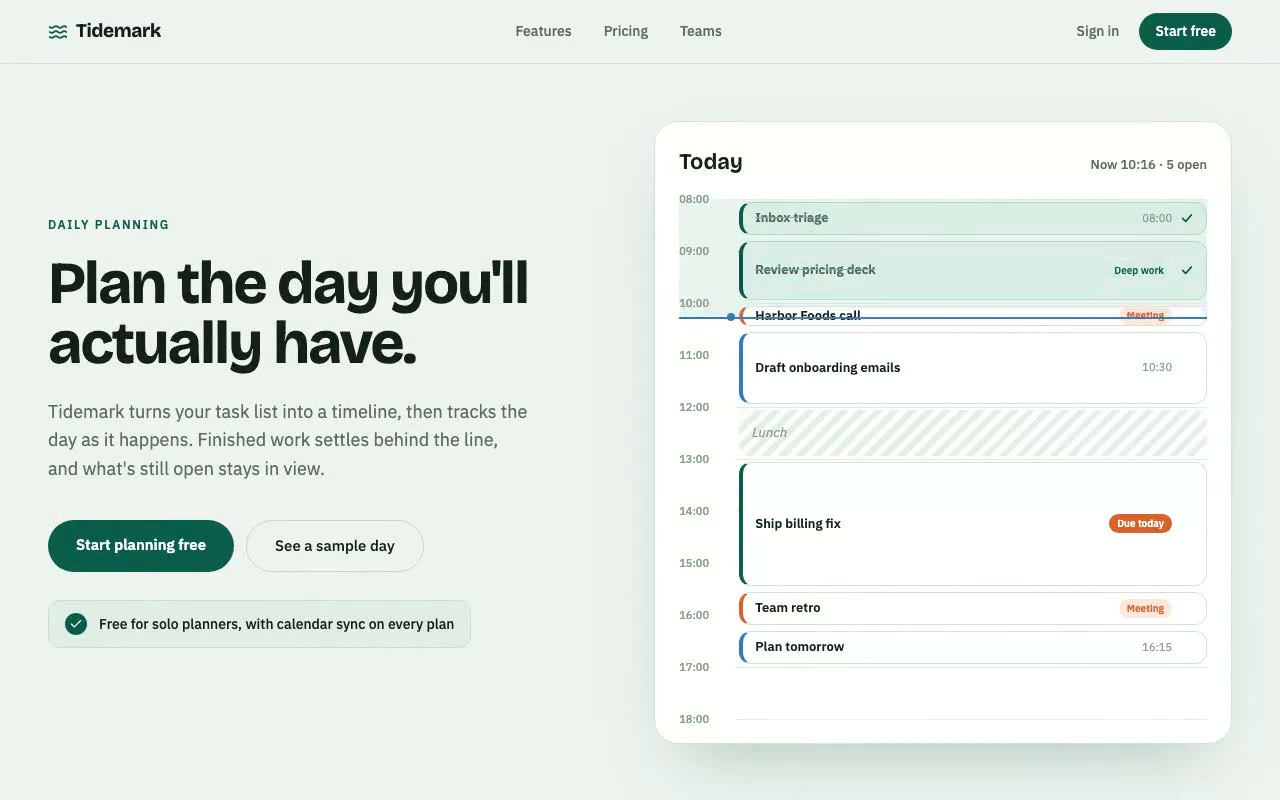
Pale sage hero with a planner card where a blue tide line passes down the timeline, ticks drawing in on finished tasks and the open-task count dropping.
Tidemark — Daily Planning SaaS Hero
A light planning hero whose day timeline has a live tidemark that sweeps down the schedule, settling each finished task behind it while the open-task count drops. Built for task managers, personal planners and team tools that want to show progress through the day.
Create a free account to copy 3 premium prompts. No card needed
- 01Copy the promptClick the button above to copy the full prompt to your clipboard.
- 02Paste into your AI toolWorks in Claude, ChatGPT, Cursor, v0, Lovable, or Bolt.
- 03Swap in your brand detailsReplace the brand name, copy, and image URLs with your own.
- 04Drop the code into your projectThe output is a self-contained React component. Paste it straight in.
What it generates
- ✓Split hero: a bold display headline and CTAs on the left, a planner card on the right
- ✓Day timeline from 08:00 to 18:00 with blocks sized to their real duration
- ✓A tidemark line that moves through the day, with a tinted zone for the time already passed
- ✓Tasks that settle to a mint done state with an SVG tick drawn in as the tide passes them
- ✓Live header counter that reads "Now HH:MM · N open" and updates as the day moves on
- ✓Colour-coded tags for meetings, deep work and due-today items, with a hatched lunch break
- ✓Staggered block entrance on load and a calendar-sync info card under the CTAs
- ✓Reduced-motion fallback that freezes the tide at 11:00 with the first tasks already ticked
Best for
- →Personal task managers and daily planners
- →Team productivity and project tools
- →Calendar and scheduling apps
- →Solo-founder and freelancer products
Not suitable for
- ✕Full multi-page websites (hero only)
- ✕Backend or database logic
- ✕Non-React frameworks (Vue, Svelte, etc.)
Written for
- ✓ClaudePreview built with Claude
- ✓ChatGPTPaste into a chat
- ✓CursorBuild inside your repo
- ✓v0 by VercelComponent generator
- ✓LovableApp builder
- ✓BoltIn-browser builder
Licence
Commercial use included. Use in client projects, products, and paid work. No attribution required.
Common questions
Related reading
Landing Page Hero Section Best Practices for 2026: The 7 Elements
Hero section best practices for landing pages and homepages: the seven elements every hero needs, the mistakes that cost conversions, and a checklist to use today.
Claude Prompts for Web Design: How to Write Them
Claude prompts for web design that produce a site you would ship, not a generic template. The structure, with examples you can copy.
Related prompts