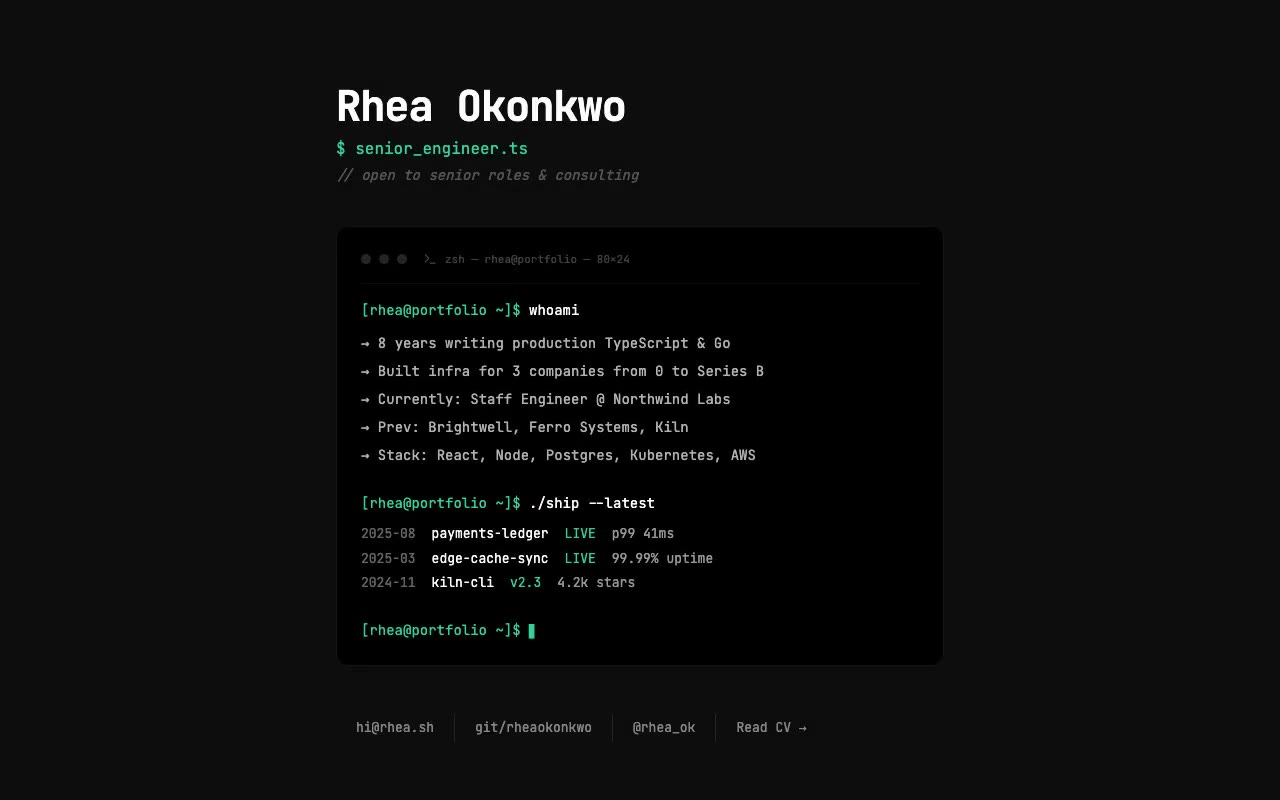
A black terminal window on #0D0D0D types "whoami" character by character, then prints five emerald-accented profile lines, followed by a second typed command that lists shipped projects.
rhea.sh — Terminal Developer Portfolio
A developer portfolio that plays out as a live shell session: the terminal types whoami and ./ship --latest on load and prints the résumé and shipped projects line by line. Built for backend, infrastructure and full-stack engineers.
This is 1 of 5 always-free prompts.
Unlock all 52, plus every new prompt we add, from $15/month, or $249 once for lifetime access.
See pricing →- 01Copy the promptClick the button above to copy the full prompt to your clipboard.
- 02Paste into your AI toolWorks in Claude, ChatGPT, Cursor, v0, Lovable, or Bolt.
- 03Swap in your brand detailsReplace the brand name, copy, and image URLs with your own.
- 04Drop the code into your projectThe output is a self-contained React component. Paste it straight in.
What it generates
- ✓Monospace-only developer portfolio hero with a header and a terminal block
- ✓Typed command mechanic: whoami and ./ship --latest typed at set speeds with a useTyped hook
- ✓Output lines and shipped-project rows that print in sequence with staggered delays
- ✓Terminal window chrome with three window dots and a Terminal icon
- ✓Blinking block cursor on the final prompt line
- ✓Contact row with divider lines that link email, a git handle, social and CV
- ✓Full reduced-motion path that shows the finished session immediately
- ✓Responsive layout that hides the date column and wraps contact links on small screens
Best for
- →Backend, infrastructure and full-stack engineers
- →Open-source maintainers and developer advocates
- →Freelance engineers and consultants
- →Anyone wanting a portfolio that reads like their own shell
Not suitable for
- ✕Full multi-page websites (hero only)
- ✕Backend or database logic
- ✕Non-React frameworks (Vue, Svelte, etc.)
Written for
- ✓ClaudePreview built with Claude
- ✓ChatGPTPaste into a chat
- ✓CursorBuild inside your repo
- ✓v0 by VercelComponent generator
- ✓LovableApp builder
- ✓BoltIn-browser builder
Licence
Commercial use included. Use in client projects, products, and paid work. No attribution required.
Common questions
Related reading
Landing Page Hero Section Best Practices for 2026: The 7 Elements
Hero section best practices for landing pages and homepages: the seven elements every hero needs, the mistakes that cost conversions, and a checklist to use today.
Claude Prompts for Web Design: How to Write Them
Claude prompts for web design that produce a site you would ship, not a generic template. The structure, with examples you can copy.
Related prompts