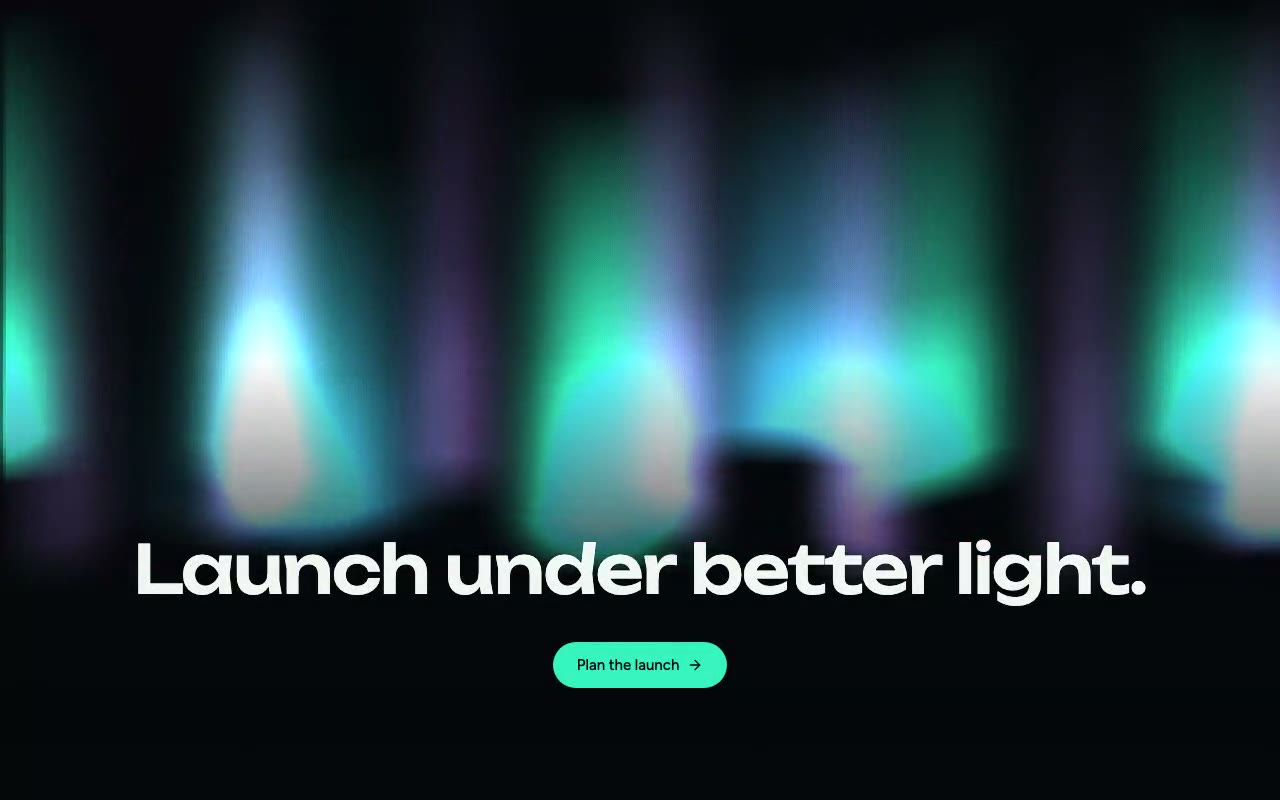
Vertical curtains of mint, sky and violet light sway and shimmer across a near-black sky, while a large display headline and a mint button rise over a dark fade.
Borealis — Canvas Aurora Background
Three layers of vertical aurora curtains in mint, sky and violet hang over a dark sky, each column brightening on its own rhythm while the curtains sway and fold slowly on canvas. For launch heroes and night-themed pages that want atmosphere, not particles.
Create a free account to copy 3 premium prompts. No card needed
- 01Copy the promptClick the button above to copy the full prompt to your clipboard.
- 02Paste into your AI toolWorks in Claude, ChatGPT, Cursor, v0, Lovable, or Bolt.
- 03Swap in your brand detailsReplace the brand name, copy, and image URLs with your own.
- 04Drop the code into your projectThe output is a self-contained React component. Paste it straight in.
What it generates
- ✓BorealisAurora component with colors, speed and intensity props
- ✓Three colour layers of vertical curtains, each drawn as overlapping gradient columns
- ✓Fold, shimmer and sway terms built from sine waves, so the motion is slow, seamless and cheap
- ✓Additive 'lighter' compositing so overlapping layers build into rich light
- ✓Bright lower edges that fade into the sky, with a gradient per layer sized to the sky
- ✓Curtains fully formed on the first frame, with no warm-up or particle seeding
- ✓Bottom fade and bottom-anchored Unbounded headline so text stays clear of the aurora
- ✓Reduced-motion fallback that draws one static frame
Best for
- →Launch and waitlist heroes with a night-sky mood
- →Astronomy, travel and weather product pages
- →Dark-mode landing pages that want atmosphere without particles
- →Event and release announcements
Not suitable for
- ✕Full multi-page websites (hero only)
- ✕Backend or database logic
- ✕Non-React frameworks (Vue, Svelte, etc.)
Written for
- ✓ClaudePreview built with Claude
- ✓ChatGPTPaste into a chat
- ✓CursorBuild inside your repo
- ✓v0 by VercelComponent generator
- ✓LovableApp builder
- ✓BoltIn-browser builder
Licence
Commercial use included. Use in client projects, products, and paid work. No attribution required.
Common questions
Related reading
Landing Page Hero Section Best Practices for 2026: The 7 Elements
Hero section best practices for landing pages and homepages: the seven elements every hero needs, the mistakes that cost conversions, and a checklist to use today.
Claude Prompts for Web Design: How to Write Them
Claude prompts for web design that produce a site you would ship, not a generic template. The structure, with examples you can copy.
Related prompts