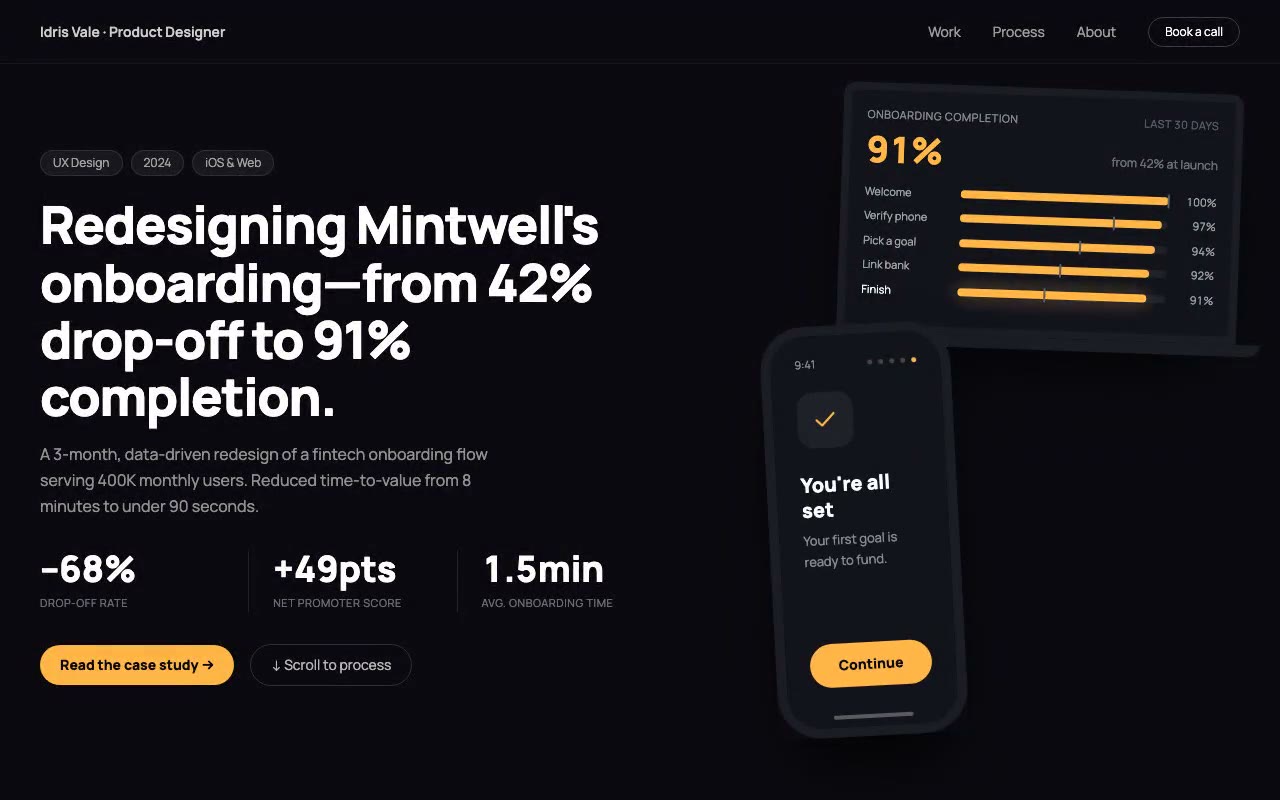
A dark case-study cover with a tilted phone and laptop; the phone steps through onboarding screens, the amber funnel bars grow over grey baselines, and "91%" counts up from 42% in the first 1.5 seconds.
Vale — Product Designer Case Study Hero
A case-study hero with a phone and laptop mockup pair: the phone walks through five onboarding screens while the laptop's completion funnel fills in amber and the headline metric counts from 42% to 91%. Built for product designers presenting UX redesigns and measurable outcomes.
Create a free account to copy 3 premium prompts. No card needed
- 01Copy the promptClick the button above to copy the full prompt to your clipboard.
- 02Paste into your AI toolWorks in Claude, ChatGPT, Cursor, v0, Lovable, or Bolt.
- 03Swap in your brand detailsReplace the brand name, copy, and image URLs with your own.
- 04Drop the code into your projectThe output is a self-contained React component. Paste it straight in.
What it generates
- ✓Case-study hero with project chips, a 52px extrabold headline and a supporting paragraph
- ✓Three outcome stats (–68%, +49pts, 1.5min) with vertical dividers
- ✓Tilted phone and laptop mockups overlapping in a relative stage with drop shadows
- ✓Five-screen onboarding walkthrough inside the phone with step dots and a sliding track
- ✓Completion funnel on the laptop: amber bars grow past grey before-markers
- ✓Count-up from 42% to 91% synced with the funnel row that matches the current screen
- ✓Primary amber CTA and ghost secondary button
- ✓Reduced-motion path that shows the final funnel state immediately
Best for
- →Product designers presenting case studies
- →UX leads sharing redesign outcomes with measurable metrics
- →Freelance designers pitching fintech, SaaS and mobile onboarding work
- →Design portfolios that need an above-the-fold proof of impact
Not suitable for
- ✕Full multi-page websites (hero only)
- ✕Backend or database logic
- ✕Non-React frameworks (Vue, Svelte, etc.)
Written for
- ✓ClaudePreview built with Claude
- ✓ChatGPTPaste into a chat
- ✓CursorBuild inside your repo
- ✓v0 by VercelComponent generator
- ✓LovableApp builder
- ✓BoltIn-browser builder
Licence
Commercial use included. Use in client projects, products, and paid work. No attribution required.
Common questions
Related reading
Landing Page Hero Section Best Practices for 2026: The 7 Elements
Hero section best practices for landing pages and homepages: the seven elements every hero needs, the mistakes that cost conversions, and a checklist to use today.
Claude Prompts for Web Design: How to Write Them
Claude prompts for web design that produce a site you would ship, not a generic template. The structure, with examples you can copy.
Related prompts